

No-Code Application Development Process
Before you start building a no-code app, you need a plan — without it, it's easy to get lost in the details and create something that doesn't meet your business goals. Explore the four key stages of the design phase: from defining the use case and analyzing technology options, through prototyping, to breaking down the vision into specific components and MVP ready to deploy.
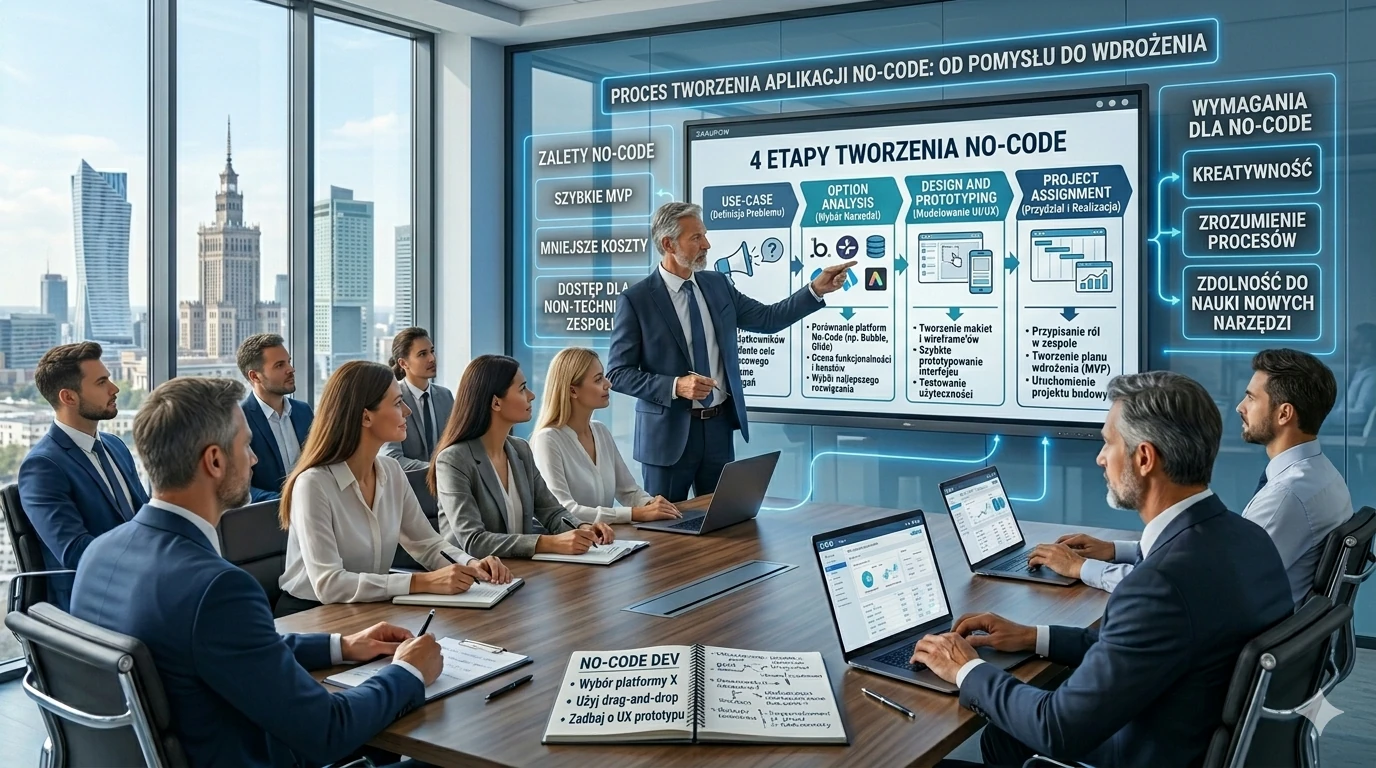
Developing an app without coding can seem easy, which makes us quickly delve into the details of the development process and lose sight of the overall goal. Like Alice in the famous fairy tale “Alice in Wonderland”, we may be inclined to immediately start creating our first no-code application without a clear target plan. However, later this can take revenge when we begin to get lost in the intricacies of the project without having a clear vision of the necessary elements needed to achieve business success. And worse, just like Alice, we can find ourselves in the wrong place and the end result can be an application that does not meet our expectations and needs. It is therefore worth starting this process with a clear understanding of the objectives and strategies to achieve the desired results.
The design phase is critical because it helps define the plan for the application and ensures that the application is being created correctly.
1. Use Case
In the first phase, the general business requirements for the created solution are determined and the criteria for business success are outlined. In this phase, it is important to maintain the right level of detail, focusing on the “what” and “why” rather than the “how”. Although it can be tempting to delve into details such as defining the application interface, specifying inputs/outputs or technological components, the Business Use Case phase should focus exclusively on high-level requirements and business processes. In this phase, it is also important to take into account the definition of business activity. It is important not to start limiting yourself too much about how this can be broken down into the next stages in the future. That will come later, but for now, let's keep a broad look at whether the solution needs to be in line with business needs.
2. Analyse options
To move from the general vision of the solution to its basic elements, you need to choose from a variety of technological options, such as ready-made software, building a dedicated application from scratch, creating in a no-code model, using templates and components. This can be difficult because there are many options, but you can use a simple decision chart to help you choose the most suitable for a given problem. This will make the solution simpler, easier to implement and maintain.
3. Design and Prototyping
This stage involves creating a vision for the solution and uses visual prototyping methods to quickly create and visualize by defining user experience (UX) and user interface (UI), workflow, analytics and other elements. The key is that the work in this phase is done with no-code tools and not by creating intermediate documents that are later converted to code. The goal of prototyping is exploration rather than detail — you are trying to quickly get a working version of the solution in a no-code environment. This prototype will contain most of the expected business processes, forms, etc., but the depth of functionality and logic may still be incomplete or temporary. The scope of this phase should be as broad as possible, in accordance with the vision resulting from the business case. Do not narrow the design to a version with a smaller scope.
4. Project Assignment
In the final step, you break down your vision into smaller pieces, such as use cases, applications, and components. At this point, you begin to plan your path to achieving your goal, focusing on the smallest range of functionality that will bring business benefits — often called the Minimum Viable Product (MVP). MVP aims to deliver basic usability quickly, without wasting time on all the features and capabilities that will be developed in the future (they will be gradually added through regular updates). Think of it as the minimum set of characteristics that are essential for the first version of a product to be useful. Once the MVP version is defined, you make important decisions about priorities, the order of dependent functions, etc. Finally, you use key tools — such as the Application Matrix — to help you choose the right delivery model based on an assessment of the complexity of the application. The delivery model you choose will determine the basis for allocating and organizing the necessary resources (e.g. budget, roles, system environments, etc.) that will be needed for the first release of the application.
The design phase, while it may seem like a linear process, should actually be mostly iterative. Actions taken in later phases can uncover new ideas or opportunities that prompt a return to earlier concepts. This is especially evident in the prototyping phase, where new ideas can influence the business process.
In conclusion, although the described approach may seem complex, it is actually quite intuitive. Effective implementation of projects based on the creation of no-code is becoming more and more accessible thanks to the development of technology. The key to success is to focus on iteration, innovation and implementation of business value through prototyping and operating in a no-code environment.
To explore this topic and learn how to effectively implement no-code projects, we encourage you to take a look at the No-code Playbook. This is a guide that comprehensively discusses the individual steps of this process, providing practical guidance, sample templates and tools useful at each stage. With this material, you will have a solid foundation to master this advanced methodology and successfully create innovative solutions without having to dive deep into the code. Download No-code Playbook


